WebSocket Request Smuggling
What is WebSocket?
WebSocket is a communication technology that allows computers to communicate with each other and enables two-way (bidirectional) interaction. If you have ever been interested in software development and wanted to build a real-time chat application, or if you needed to constantly receive data from a server while developing a simulation, you might have heard of WebSocket.
There are other communication technologies used in the web environment. The most well-known among them is probably HTTP. HTTP, which stands for Hypertext Transfer Protocol, is a communication protocol that determines how web pages and data are requested and sent between a web browser and a server.
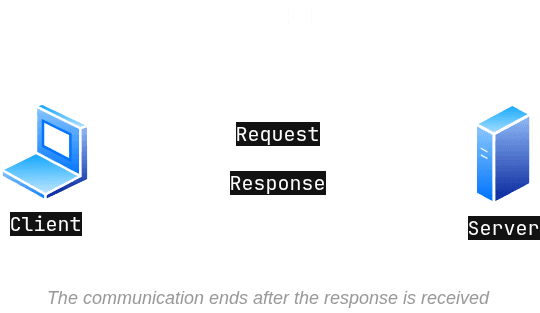
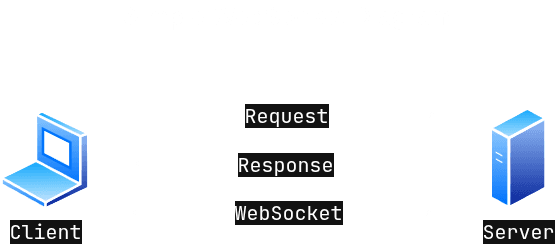
In HTTP, a request is sent to a server, and the server returns a response. After the response is received, the communication usually ends. To get new data, a new request must be sent. In WebSocket, however, once the connection is established, it stays open. Both the client and the server can continuously send data over the same connection. This provides real-time and bidirectional communication.
Similar to HTTP, WebSocket can use port 80 and is represented as ws://. For a secure connection, port 443 is used, and in this case, the address is written as wss://.
We can show the working logic of HTTP simply like this:
We can also show the working logic of WebSocket with a simple diagram in the same way:
How Does WebSocket Work?
First, the client sends a normal HTTP GET request to the server it wants to communicate with. When we look at the headers of this request, we see a header like Upgrade: websocket. Thanks to this header, the server understands that the incoming request is a protocol upgrade request.
If the server supports WebSocket, it responds with a 101 Switching Protocols status code, and the connection is upgraded to the WebSocket protocol.
From this point on, the communication between the client and the server takes place over the WebSocket protocol instead of HTTP.
Example: WebSocket Connection
I created a WebSocket server on my computer using Node.js. To connect to this server, I am sending an HTTP GET request. The HTTP header data of the request I sent is below:
GET / HTTP/1.1
Host: 127.0.0.1:3000
Connection: Upgrade
Pragma: no-cache
Cache-Control: no-cache
User-Agent: Mozilla/5.0 (X11; Linux x86_64) AppleWebKit/537.36 (KHTML, like Gecko) Chrome/145.0.0.0 Safari/537.36
Upgrade: websocket
Origin: http://127.0.0.1:3000
Sec-WebSocket-Version: 13
Accept-Encoding: gzip, deflate, br
Accept-Language: en-US,en;q=0.9
Sec-WebSocket-Key: SO7SdulZF5cyB/ljthjY7g==
Here, the Upgrade: websocket header especially draws attention. This header tells the server that the client wants to continue the communication with the WebSocket protocol instead of standard HTTP. Let's examine the important headers here one by one:
HTTP/1.1— It is mandatory information required by the standard. To establish WebSocket connections, a minimum of HTTP/1.1 version must be used.Host— Specifies the address and port (127.0.0.1:3000) of the server where the request is sent.Connection: Upgrade— Informs the server that the client wants to change (upgrade) the type of the current HTTP connection. Without this header, the protocol change process cannot happen.Upgrade: websocket— Specifies exactly which protocol the connection wants to be upgraded to.Origin— Shows the source from which the request was initiated. Browsers automatically add this for security purposes. Depending on its own security policies or CORS (Cross-Origin Resource Sharing) settings, the server can accept connections only from certain sources and reject others.Sec-WebSocket-Version— Specifies the version of the WebSocket protocol the client wants to use. Version 13 is the most common and current version specified in the RFC 6455 standards.Sec-WebSocket-Key— A randomly generated Base64 formatted key produced by the client for security and verification. It is used to test whether the server truly supports the WebSocket protocol.
The Server's Response and Handshake
When the server finds the conditions suitable, it gives a response to this GET request as follows:
HTTP/1.1 101 Switching Protocols
Upgrade: websocket
Connection: Upgrade
Sec-WebSocket-Accept: kdDtWzJEGLQinBigXrLjpZdqGRE=
As you can see, the server confirmed our protocol change request by sending the 101 Switching Protocols status code.
When we look at the handshake process from the server's side, the most noticeable part is the Sec-WebSocket-Accept header. This header is there for the server to indicate to the client that it genuinely supports WebSocket.
Again, the value of this header is in Base64 format. Let's examine how this is generated.
The server takes the Sec-WebSocket-Key value we sent and adds a fixed text (magic string) to the end of this value. Then, it hashes this obtained value using the SHA-1 algorithm. Finally, it converts this hash value into Base64 format so it can be carried smoothly in HTTP headers, and sends it to the client. If we decode the Base64 value returning with this header using Base64 to HEX tools, we will encounter a SHA-1 output. For example:
$ echo "kdDtWzJEGLQinBigXrLjpZdqGRE=" | base64 -d | xxd -p
91d0ed5b324418b4229c18a05eb2e3a5976a1911
If we understand this part, let's continue explaining the handshake process.
The browser also does a similar calculation. If the value it finds exactly matches the value coming from the server, the handshake process is successfully completed. Also, the 101 status code coming from the server shows that this protocol switch is approved. If the 101 code had not returned, this protocol switch would be canceled.
After all these verification steps are passed, HTTP steps aside, and a continuous, bidirectional WebSocket communication begins between the two parties.
So, what happens if we add a Reverse Proxy in the middle of all this communication process?
What is a Reverse Proxy?
To better understand Reverse Proxy, let's first examine the Forward Proxy concept that most of us know.
The type of proxy server we call Forward Proxy plays an intermediary role between the user (client) and the target server. Normally, when a user wants to access a server on the internet, their computer communicates directly with the target server. However, when a user starts using a Forward Proxy, their device now only sends requests to this proxy server. The proxy server handles all communication with the target server on behalf of the user. In this case, the target server on the internet does not know who the actual user is (or their IP address); it only sees the proxy server in front of it.
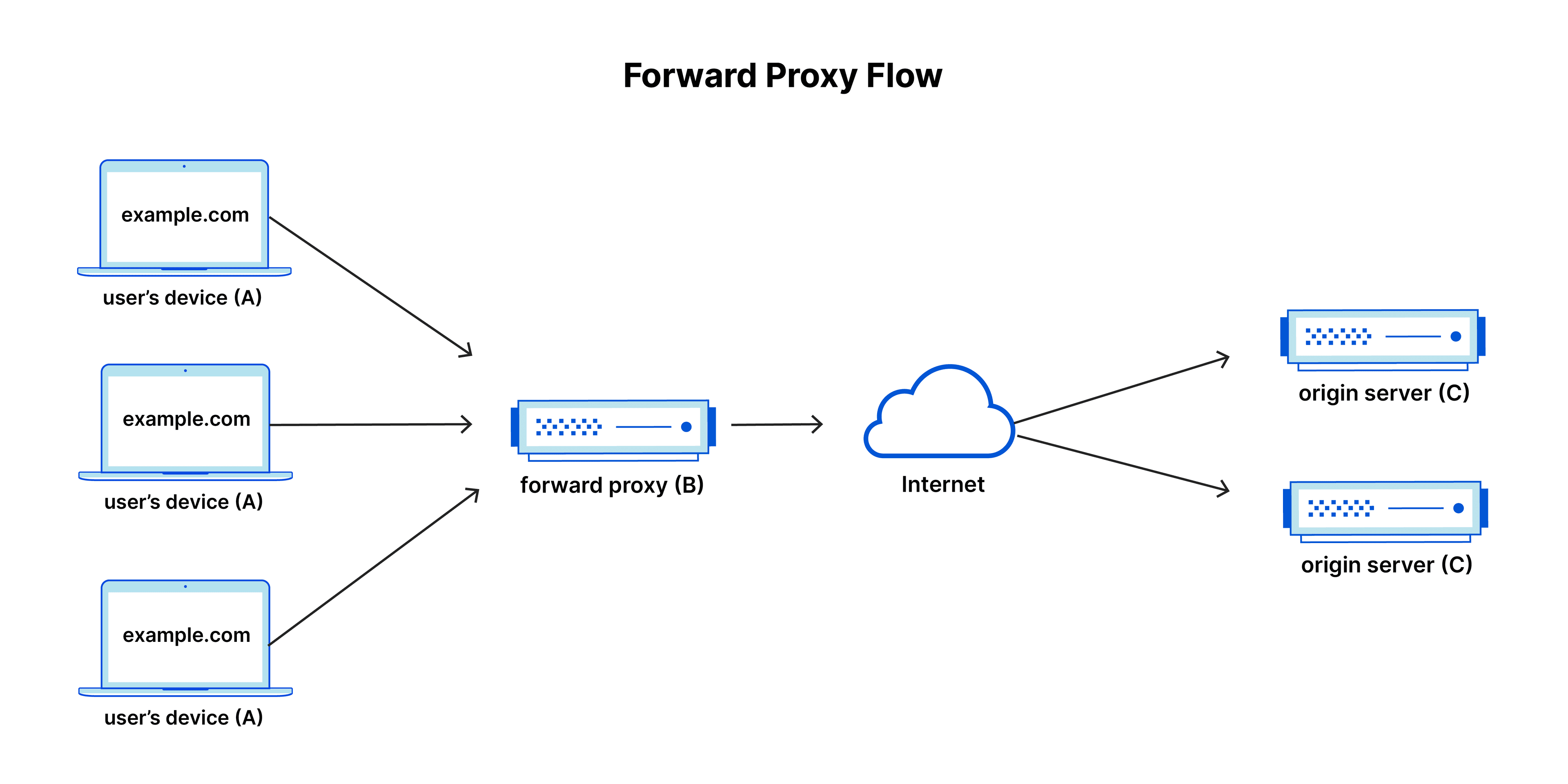
Source: cloudflare.com
In a Reverse Proxy, the direction of events is completely different.
If a Forward Proxy represents the user and hides them, a Reverse Proxy, in the exact opposite way, represents the server and hides it.
When a user wants to access a website on the internet (for example, an application you developed), they don't actually connect directly to your main servers. The Reverse Proxy, standing on the front lines of your application, receives the request. The Reverse Proxy takes this incoming request from the outside, forwards it to the actual servers running in the background, and returns the response it gets from the server back to the user as if it produced it itself.
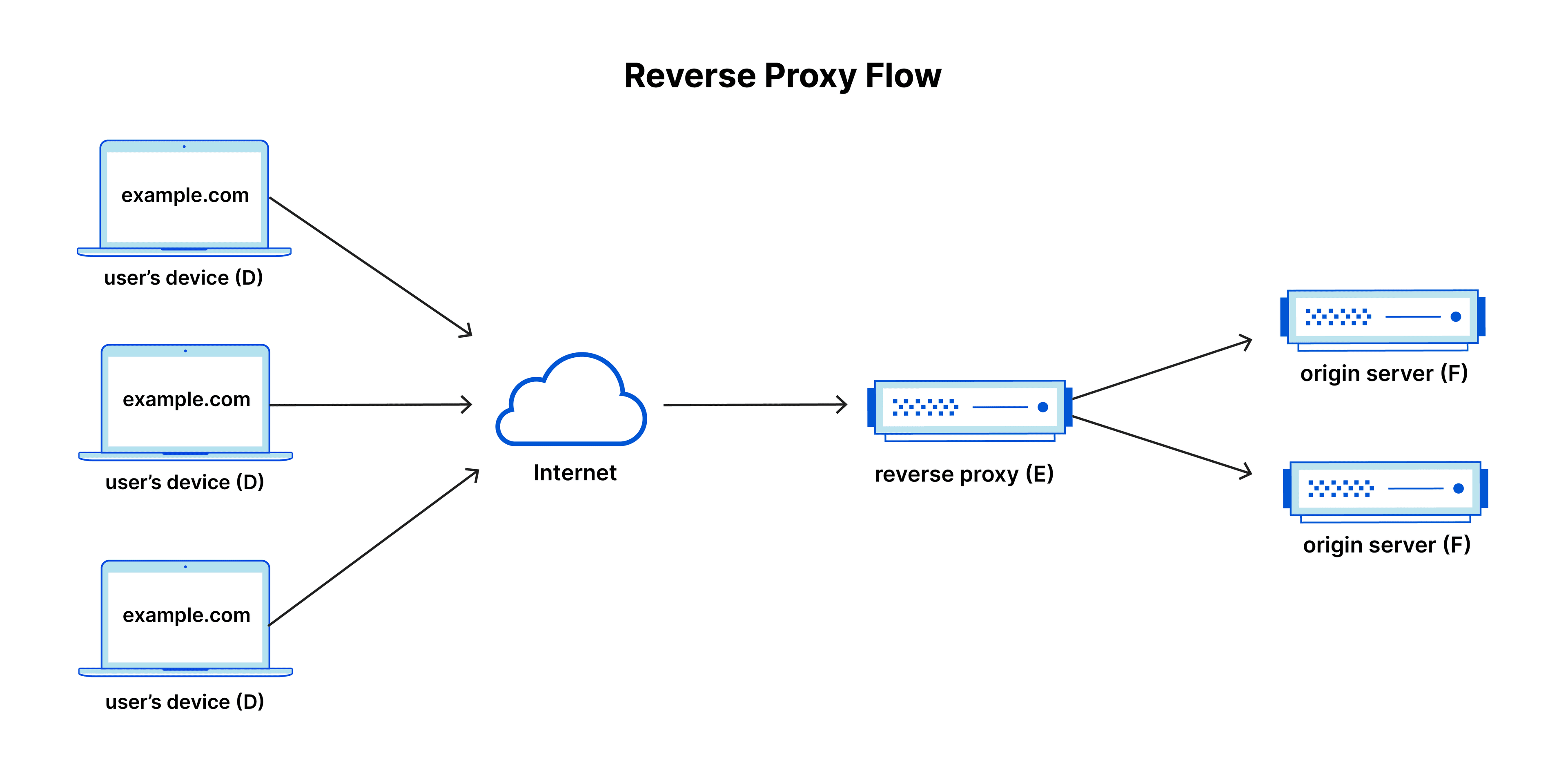
Source: cloudflare.com
Now that we understand the Reverse Proxy concept, let's examine that process we mentioned. What happens if a Reverse Proxy is placed between the client and the WebSocket server?
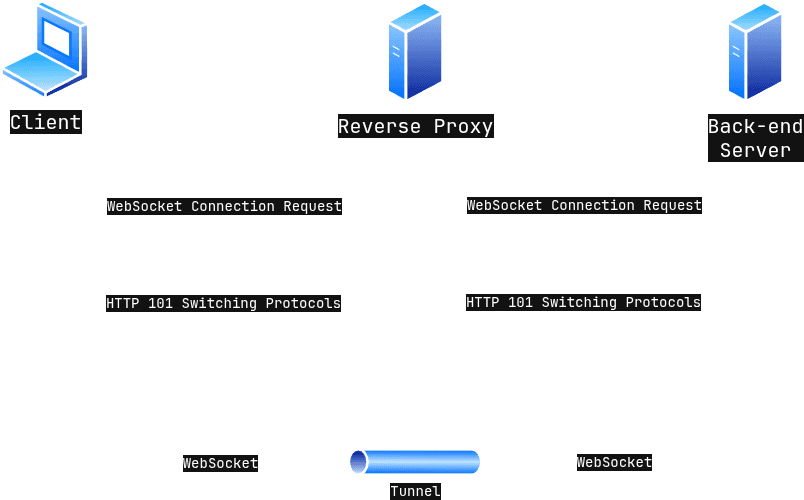
As can be seen from the figure, there is a proxy server in between. We need to ask a question here. Will the back-end server do the connection upgrade, or will the proxy server?
Most proxy servers do not engage in such a process. In this case, the back-end server will still make the WebSocket connection with the client. After the connection is upgraded, the proxy server establishes a tunnel between the client and the server. This way, WebSocket requests can be forwarded from the client to the back-end server.
By abusing this operation of the system, it is possible to secretly send HTTP requests to the back-end server. The basic logic of this process is to make the proxy server believe as if a WebSocket connection will be established between the client and the back-end server. If the proxy server believes this lie, a tunnel is created between the client and the back-end server, and this way, we can send standard HTTP requests through this tunnel.
Normally, when a WebSocket tunnel is created between the client and the back-end server, you cannot send HTTP requests. Because the server expects a WebSocket request from you. Then how is it possible that we can send HTTP requests?
The answer to the question is actually hidden within the paragraph: "the basic logic of this process is to make the proxy server believe as if a WebSocket connection will be established between the client and the back-end server." Actually, there will be no WebSocket connection between the client and the back-end server. We will create a tunnel just by making the proxy server believe that this will happen. Once the tunnel is created, since there is no real WebSocket connection anyway, the server will become ready to accept HTTP requests.
One way to do this is to change the value of the Sec-WebSocket-Version header in the HTTP GET request sent by the client. Most systems use version 13. If we enter an invalid version number here, the back-end server will reject this connection request.
As an example, I changed the version to 8 and got this response from the server:
HTTP/1.1 426 Upgrade Required
Connection: close
Content-Type: text/html
Content-Length: 16
Sec-WebSocket-Version: 13

Upgrade Required
As seen here, I received the 426 Upgrade Required response. In this case, the server continues to use HTTP with the client instead of WebSocket. But if the Reverse Proxy in between does not check this situation, it creates a tunnel even if the upgrade fails. This is exactly where the security vulnerability appears.
In this post, I will not explain how to exploit this vulnerability. Instead, I will talk about what kind of defense measures can be taken.
How to Defend?
We saw that the main source of the problem is that the Reverse Proxy blindly creates a tunnel by just trusting the Upgrade header coming from the client, without sufficiently inspecting the response coming from the back-end server.
So how can we protect our system against such tunneling and bypass attacks?
There are multiple answers to this question. In this post, we will examine a few of the defense strategies.
1. Reverse Proxy Validating Status Codes
If you have understood the topics we have examined so far, you might have actually found this strategy yourself.
One of the most effective solutions is to correct the behavior of the Reverse Proxy. That means, the proxy server must absolutely check the HTTP status code returning from the back-end server before creating a tunnel between the client and the back-end.
If the back-end server returned the 101 Switching Protocols status code, it should create the tunnel and allow WebSocket traffic. However, if the server sends another status code like 426 Upgrade Required, the proxy must absolutely not create a tunnel and should immediately terminate the connection with the client.
You should make sure that this check is active in modern proxy configurations.
2. Back-end Server Closing the TCP Connection
Relying solely on the proxy server is a wrong choice. Besides, this thought goes against the Defense in Depth principle.
The back-end server should ensure its own security instead of completely trusting the proxy server. At this point, when an invalid version (like Sec-WebSocket-Version: 8) or a faulty WebSocket handshake request is received, instead of just returning an error message, it must absolutely add the Connection: close header inside the response and terminate the connection right after sending the response.
At this point, when the TCP connection breaks, the proxy won't be able to leave an open tunnel even if it wants to.
3. Using WAF and Strict Header Inspection
At the Reverse Proxy or Web Application Firewall (WAF) layer, strict inspection should be done on the headers of incoming requests. For example, if the Connection header contains Upgrade, it can be checked whether the Upgrade header contains websocket, or by checking the Sec-WebSocket-Version header, only supported versions can be allowed to pass.
These checks can be expanded.
4. Keeping Software Up-to-Date
Older versions of popular Reverse Proxy software like Nginx and Apache contained the security vulnerability we mentioned above. This vulnerability has been patched in modern versions. You should make sure that the software you use in your infrastructure always runs on up-to-date and secure versions.
5. Timeout Policies
To prevent successfully established or accidentally left open tunnels from being exploited forever, timeout rules on the proxy should be tightened. It is appropriate to automatically cut off connections that have had no data flow for a certain period of time (for example, 30-60 seconds).
In this post, we talked about WebSocket technology, concepts like Forward Proxy and Reverse Proxy, the security vulnerabilities that can arise when these technologies are used together, and the precautions that can be taken against them.
See you in the next post!